
UPI and bank SMS expense tracker for Android
Every UPI payment logged in seconds, in your own Google Sheet
Kharch Log reads the bank and UPI SMS your phone already gets and turns each one into a clean expense or income row: amount, payee, payment mode and date. PhonePe, Google Pay, Paytm, cards and cash all land in one money book, and every row is saved to a Google Sheet in your own Drive. No bank login, no ads, no monthly subscription.
- No bank login
- Your own Google Sheet
- Needs review inbox
- Credits for money lent
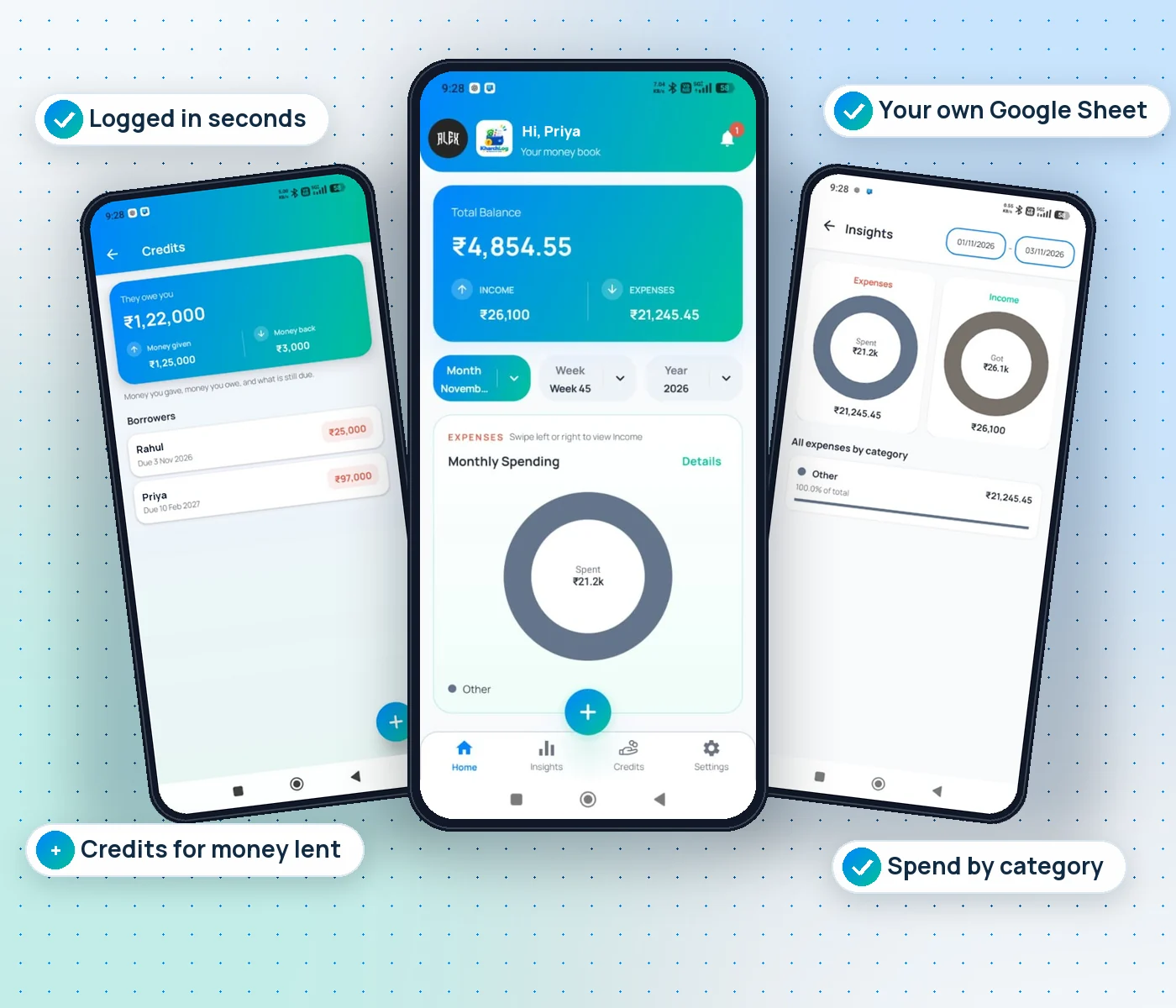
Quick answer: Kharch Log is an Android expense tracker built for India. Give it SMS permission once and it picks up debit and credit alerts from your bank and UPI apps within seconds of the SMS arriving, then saves them to a Google Sheet that you own. Unclear messages wait in a Needs review inbox instead of guessing. You can also add cash by hand or by voice, track money you lent in Credits, and share a payment receipt or a PDF bill with your UPI QR. It costs ₹149 once, for life.
What is Kharch Log?
Most of India pays by UPI now, and almost every payment sends an SMS. Kharch Log turns those SMS into a money book you never have to type.
Expense apps usually ask for one of two things: your patience, because you type every ₹20 chai and ₹60 auto ride yourself, or your bank login, so a third party can pull your statements. Kharch Log does neither. It reads the payment SMS that already land on your phone, works out the amount, the payee, the payment mode (UPI, debit card, credit card, NACH, cash) and the time, and writes a row. The parsing happens on your phone. The rows go to a Kharch Log spreadsheet in your own Google Drive, not to a server we run, so your history is yours to open, filter, chart, share with family or export to Excel any time.
On top of that ledger you get a simple home screen with your balance for the month, week or year, category insights, a search for every transaction, Credits for money you gave or borrowed, and one-tap sharing of any payment as a clean receipt. The whole app works in English, Hindi, Telugu, Urdu and six more languages.
UPI and bank SMS capture
Your UPI payments, logged the moment the SMS lands
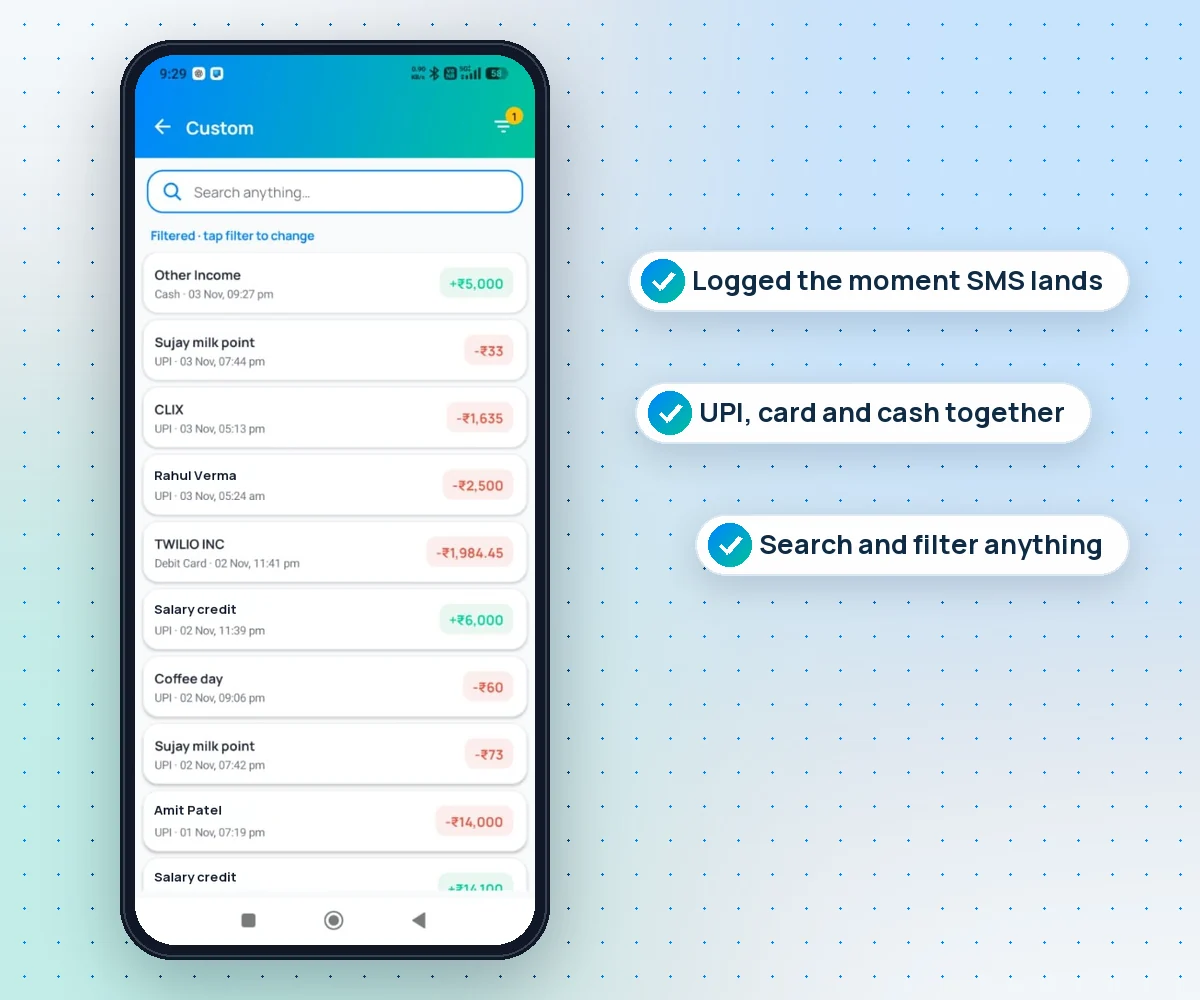
Pay a shop by PhonePe, a friend by Google Pay or a bill by card. The bank SMS arrives, and a few seconds later the expense is in Kharch Log and on your Sheet, ready to share.
- Works with bank SMS from SBI, HDFC, ICICI, Axis, Kotak and other Indian banks
- Covers PhonePe, Google Pay, Paytm and BHIM, because your bank sends the SMS
- Debits and credits, salary, refunds, card and NACH payments
- Search and filter every transaction by date, mode or payee
Needs review inbox
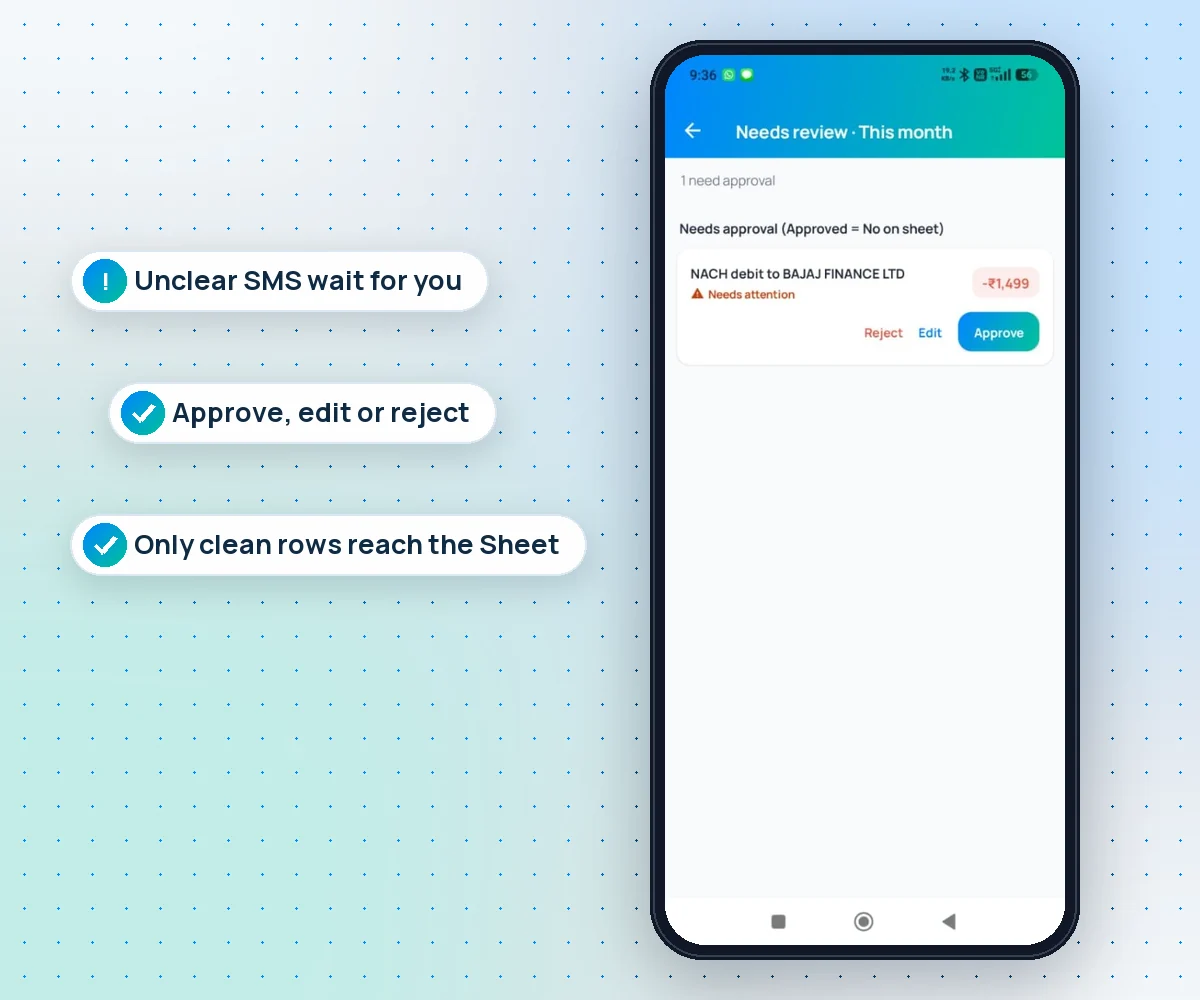
Unclear SMS wait for you, never guessed
An auto-debit with no clear payee, an odd bank format, a message that could be a duplicate: Kharch Log puts it in Needs review instead of inventing a row.
- Approve, edit or reject each one in a single tap
- Fix the amount, category or payee before it counts
- Unapproved rows are marked "Approved = No" on your Sheet
- OTPs and promo SMS stay out of your money book
Google Sheets sync
An expense tracker in Google Sheets that fills itself
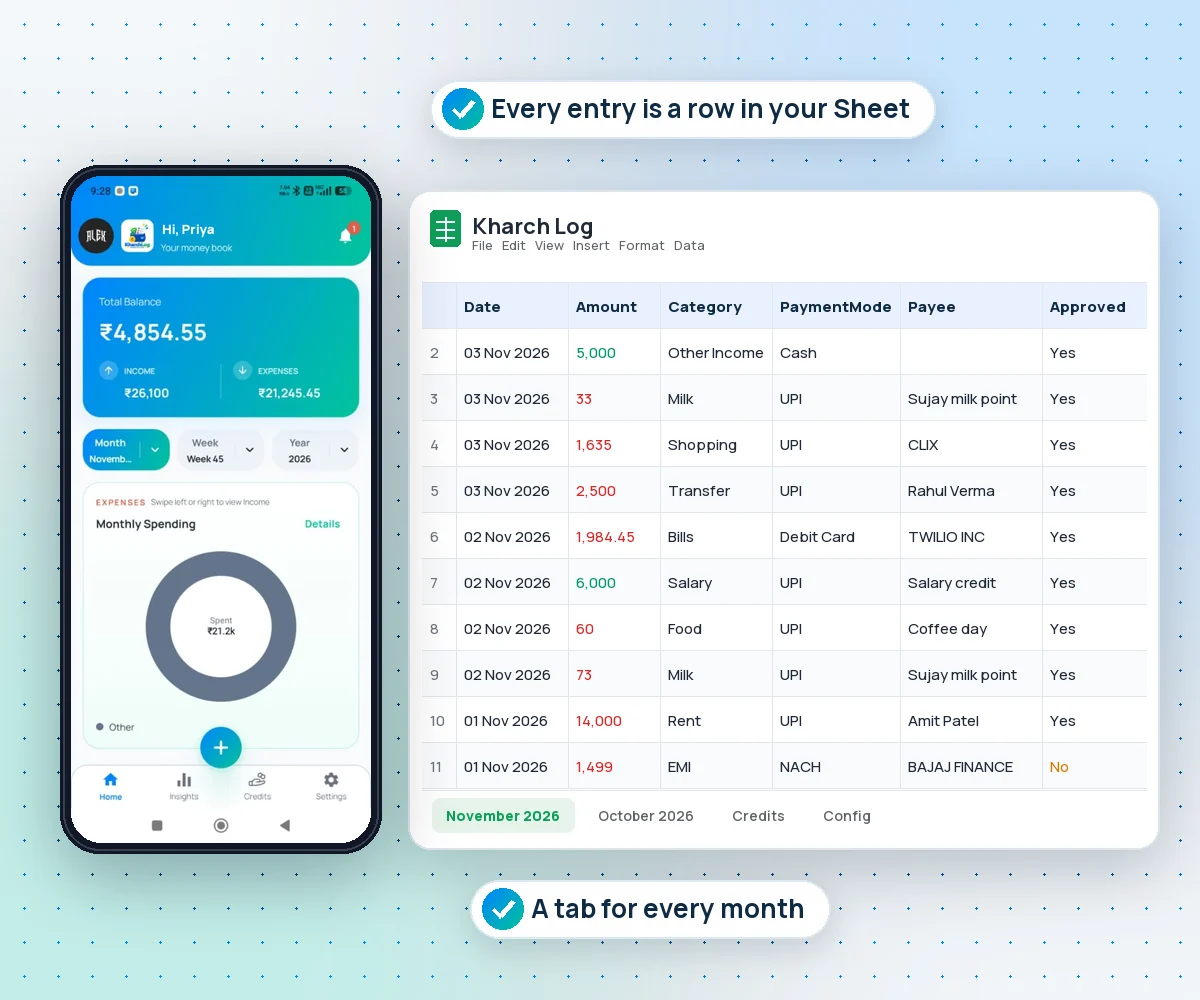
Every expense and income you log becomes a row in a Kharch Log spreadsheet in your own Google Drive, with a tab for every month and a Credits tab.
- Date, amount, category, payment mode, payee and UPI reference
- Kharch Log can only open the files it creates in your Drive
- Pivot, chart, share with family or download as Excel
- Stop using the app and your history stays in your Drive
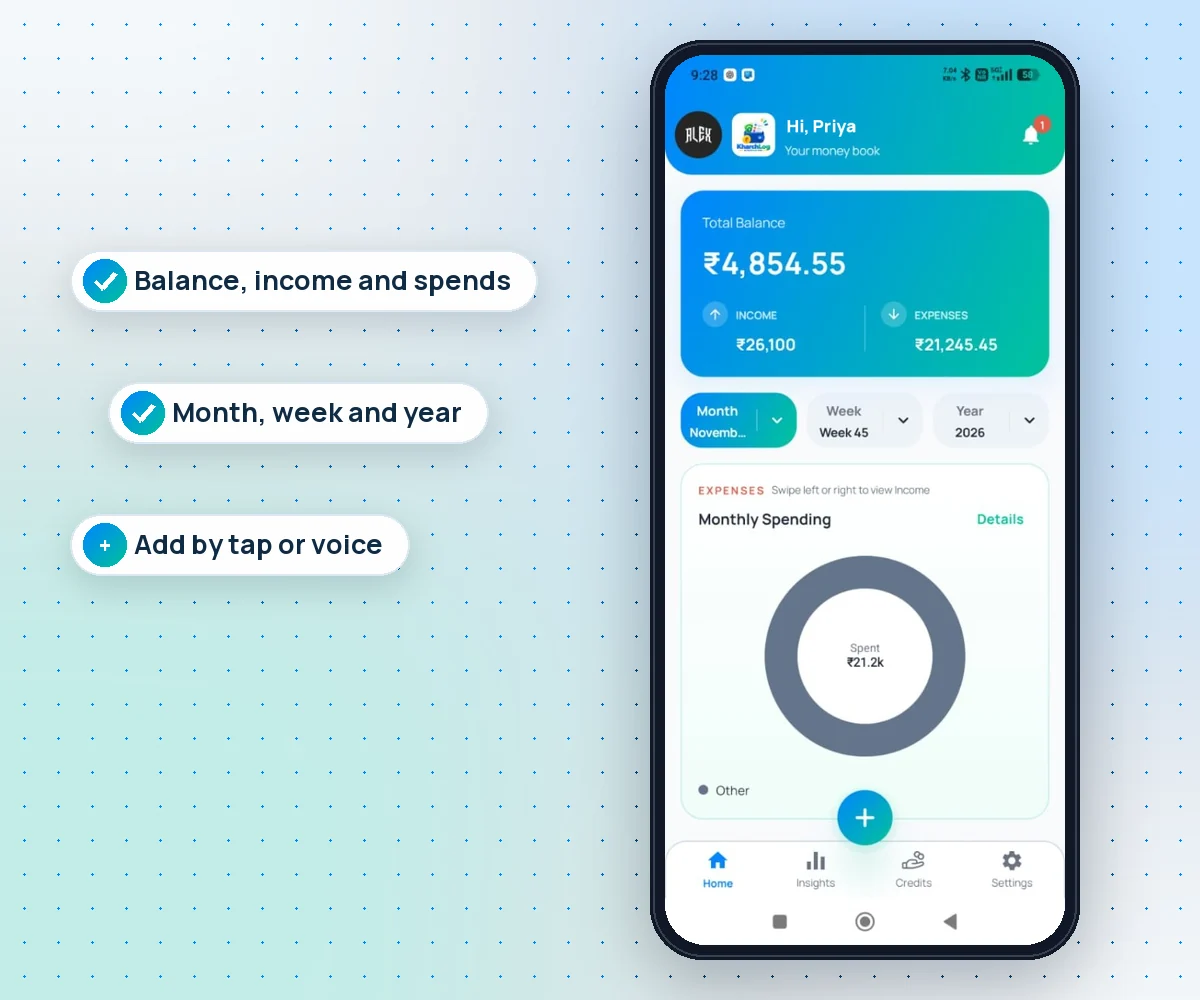
Your money book
Balance, income and spend at a glance
Open the app and see where you stand: total balance, money in and money out for this month, this week or this year.
- Switch between month, week and year in one tap
- Monthly spending chart by category, swipe for income
- Add cash or anything without an SMS with the + button
- Speak an expense with the voice assistant
Spending insights
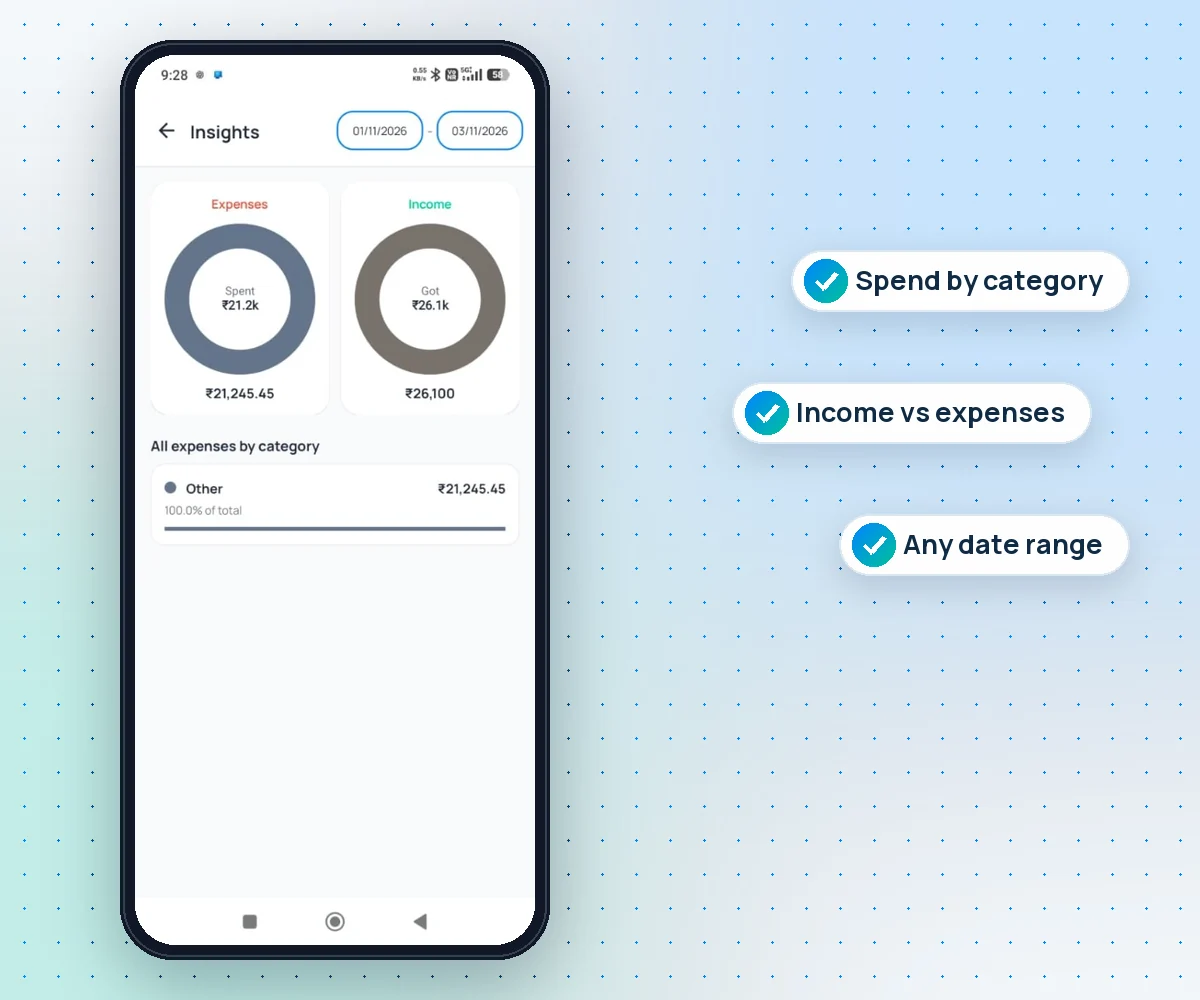
See where the money actually went
Pick any date range and Kharch Log splits what you spent and what you got by category, with each category's share of the total.
- Expenses and income side by side for any dates
- Every category with its amount and percent of total
- Your own income and expense categories
- The same rows in your Sheet for pivots and charts
Credits
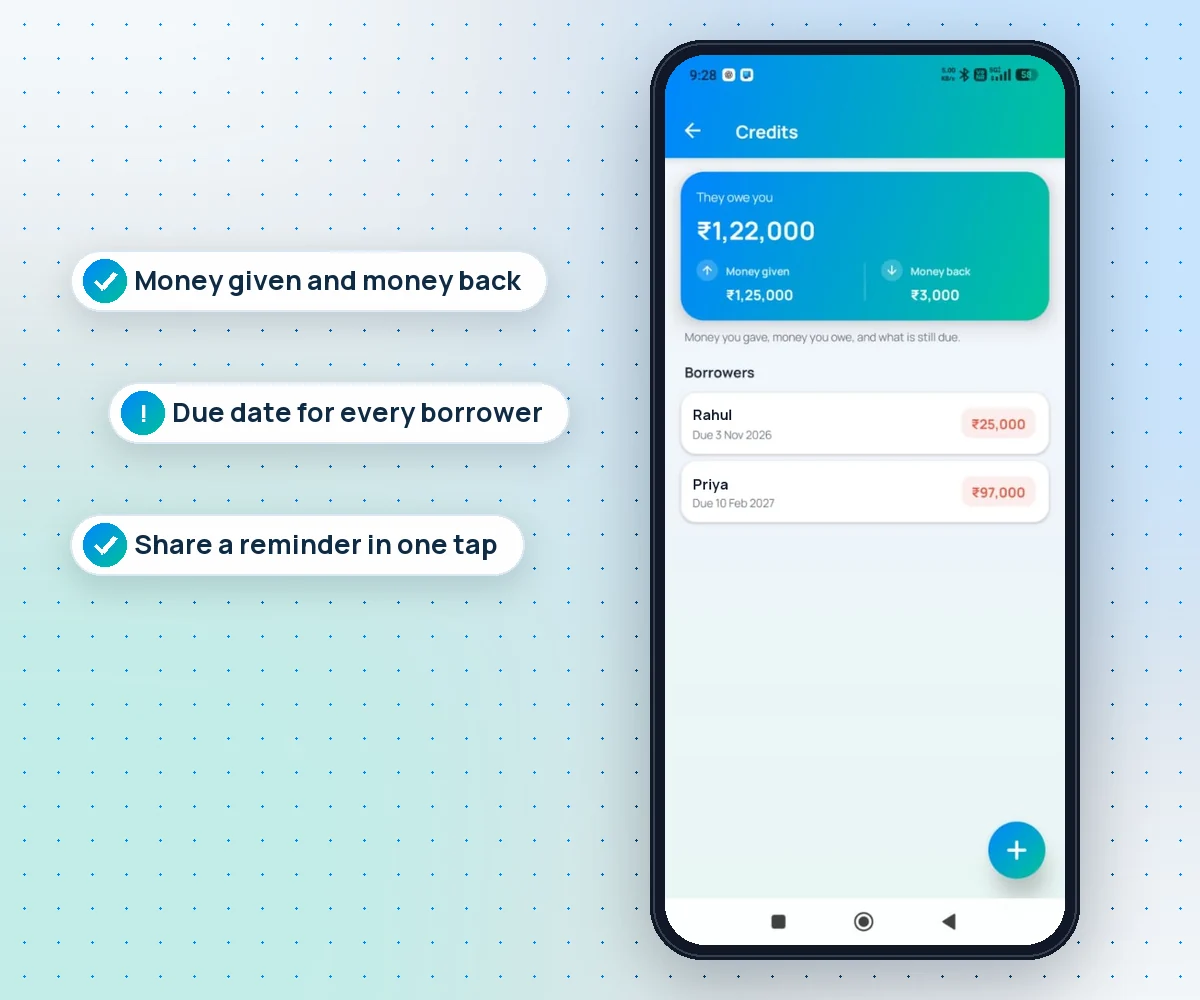
Money you lent, and when it is due
Gave a friend ₹25,000 or borrowed from family? Credits keeps money given, money back and what is still due, person by person.
- A due date for every borrower, with a reminder on the day
- Add part payments and the amount still due updates itself
- Send a polite reminder on WhatsApp in one tap
- Share a PDF bill with a QR to pay you by UPI
Share and PDF bill
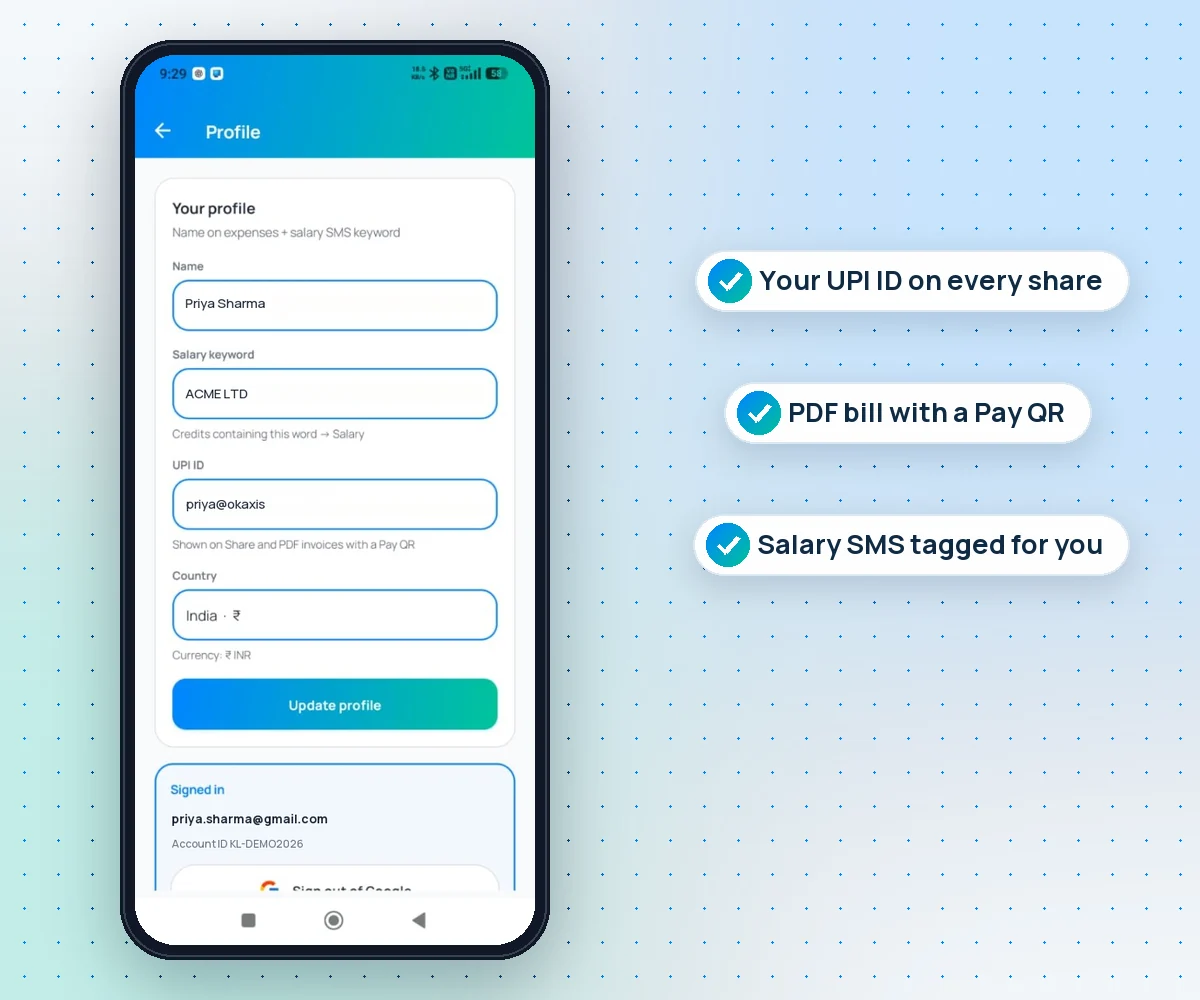
Share a payment receipt in seconds
Someone asks "did you pay?" Open the entry, tap Share and send a clean receipt with the amount, date, mode and UPI reference. Or save it as a PDF bill.
- Share on WhatsApp or any app as a card or PDF
- Your UPI ID and a Pay QR on the bill, if you want it
- Your name on every bill, set once in your profile
- Salary keyword turns your salary SMS into a Salary entry
Voice, languages and Sheet
Speak it, read it in your language, keep it in your Sheet
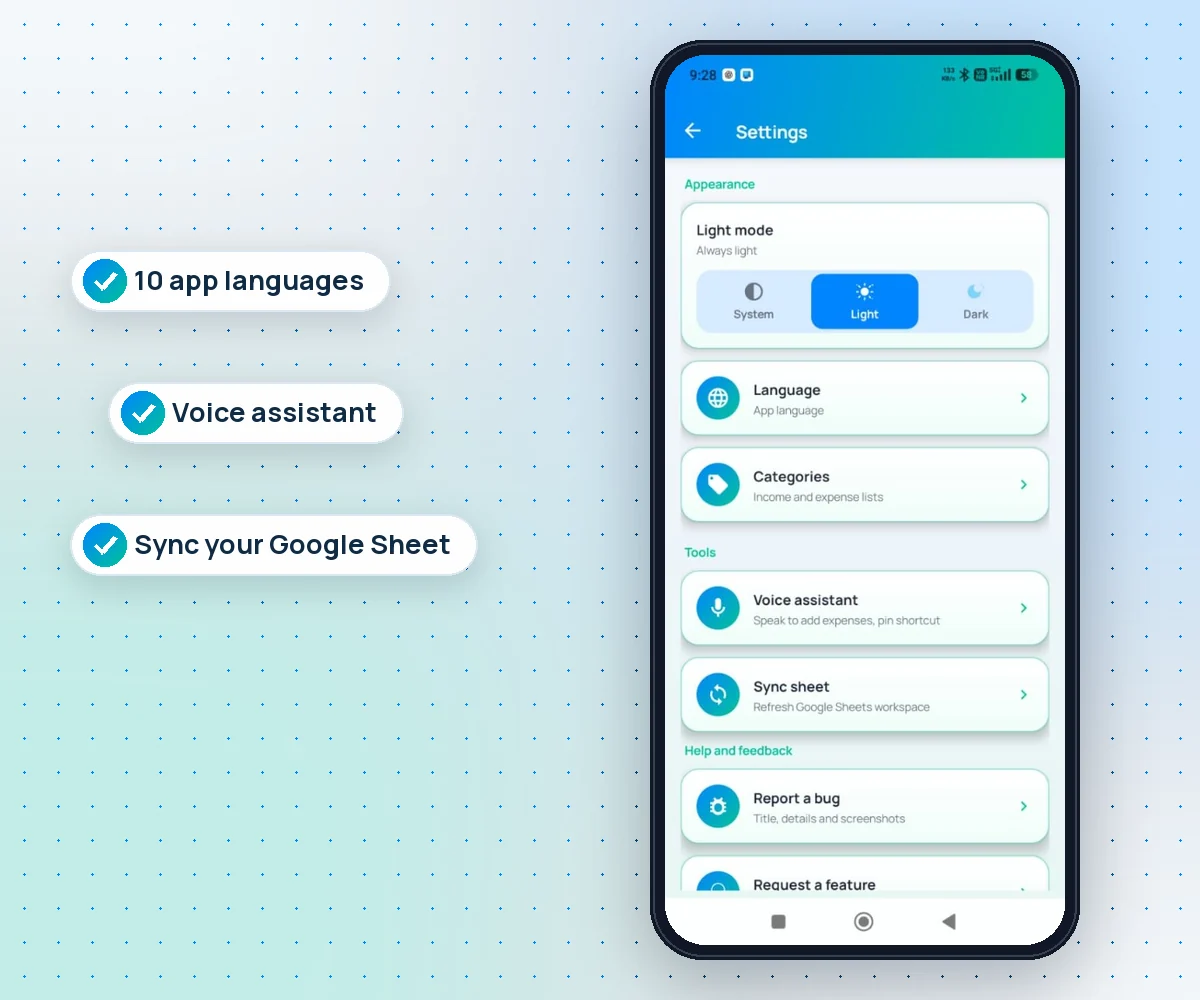
Say "200 rupees petrol" and it is logged. Use the app in Hindi, Telugu or Urdu. Sync your Google Sheet whenever you like.
- Voice assistant with a home screen shortcut
- 10 app languages and any currency
- Light, dark or system theme
- Report a bug or ask for a feature from inside the app
Every feature in Kharch Log
All of it is included in the ₹149 lifetime unlock. No tiers, no add-ons.
Bank SMS auto-capture
Debit and credit SMS from Indian banks become rows within seconds, even when the app is closed.
UPI expense tracking
PhonePe, Google Pay, Paytm and BHIM payments are caught through your bank's SMS.
Needs review inbox
Unclear messages wait for approve, edit or reject. Nothing is guessed.
Google Sheets sync
A Kharch Log folder and spreadsheet in your Drive. The app can only touch files it made.
Manual entry
Amount, category, payment mode, payee and notes for cash and anything without an SMS.
Voice entry
Speak an expense or income and confirm. Pin a voice shortcut to your home screen.
Missed SMS catch-up
If the phone was off or busy, payment SMS it missed are picked up from your inbox later.
Instant notifications
A notification for each logged payment. Tap it to open that transaction.
Home dashboard
Balance, income and expenses for the month, week or year.
Spending insights
Expense and income charts by category for any date range.
Search and filters
Find any payment by name, amount, mode or date range.
Custom categories
Your own income and expense lists, renamed or removed any time.
Credits
Money lent and borrowed, part payments, still due, and due date reminders.
WhatsApp reminders
A ready, polite reminder for anyone who owes you, in one tap.
Share receipt
Send any payment as a clean card with amount, date, mode and UPI reference.
PDF bill with UPI QR
Save a bill with your name, UPI ID and a QR so people can pay you back.
Salary detection
Set a keyword and salary credits are tagged as Salary automatically.
10 languages
English, Hindi, Telugu, Urdu, Chinese, Japanese, Korean, French, Spanish and German.
Any currency
Pick your country and currency in your profile.
Light and dark mode
Follow the system or pick one.
No ads, ever
No ads, no loan offers, no credit card pitches inside the app.
How to track UPI expenses automatically
Four steps, about two minutes, no bank login.
- 1
Install Kharch Log from Google Play
It runs on Android 7 or newer. Unlock lifetime access for ₹149 once.
- 2
Sign in with Google
Kharch Log creates its own folder and spreadsheet in your Drive. It cannot see your other files.
- 3
Allow SMS and notifications
SMS lets it read payment alerts on your phone. Allowing it to run in the background keeps capture working when the screen is locked.
- 4
Pay as usual
Every UPI, card or bank SMS turns into a row. Approve anything unclear in Needs review and add cash by hand or by voice.
Why an SMS expense tracker works so well in India
In India nearly every digital payment triggers an SMS from your bank: UPI transfers, card swipes, auto-debits for EMIs and SIPs, salary credits and refunds. That SMS is the most complete record of your spending you already have, across every bank account and every UPI app. The problem is that it sits in your inbox, mixed with OTPs and offers, and nobody adds it up.
Kharch Log is a UPI expense tracker built on that fact. Instead of asking you to type each payment, or to link your bank through net banking or the Account Aggregator framework, it reads the alert on your phone and logs it. That is why one app can cover PhonePe, Google Pay, Paytm and card spends together: the bank sends the SMS no matter which app you paid with.
- No bank login: you never share net banking passwords, card numbers or consent to pull statements.
- On your phone: SMS are read on the device. Only the finished row (amount, payee, mode, date) goes to your Sheet.
- Honest data: anything the app is unsure about goes to Needs review, so your totals are not padded with guesses.
- Cash too: the + button and the voice assistant cover kirana cash, tips and anything without an SMS.
Kharch Log compared with other ways to track expenses
| What you get | Kharch Log | Bank-link apps | Manual expense apps | Excel or Sheets template |
|---|---|---|---|---|
| Logs UPI payments for you | Yes, from bank SMS | Yes, from linked accounts | No, you type each one | No, you type each one |
| Bank login or consent needed | No | Yes | No | No |
| Where your data lives | Your own Google Sheet | The app's servers | Usually the app's cloud | Your file |
| Checks unclear entries | Yes, Needs review inbox | Varies | Not needed | Not needed |
| Track money you lent | Yes, with due dates | Rarely | Sometimes | Build it yourself |
| Ads, loans or card offers | None | Often | Often on free plans | None |
| Price | ₹149 once, for life | Free with offers, or monthly | Free with ads, or monthly | Free, your time |
Your expense tracker in Google Sheets, without the busywork
People love a Google Sheets expense tracker or an Excel budget sheet because they own the file. The catch is upkeep: miss three days of UPI and the sheet is wrong. Kharch Log keeps the spreadsheet you want and removes the typing. Every captured or added entry becomes a row in your Kharch Log Sheet in Drive, so you can build pivots, monthly totals and charts, share it with your partner, or download it as Excel or CSV for your CA. If you ever stop using the app, your history is still sitting in your Drive.
Who Kharch Log is for
- Salaried people who pay for everything by UPI and want to see where the month went.
- Families and couples who want one shared Google Sheet for household kharcha.
- Students and first jobbers tracking rent, food delivery and travel on a tight budget.
- Freelancers and shop owners who need to share a payment receipt or a bill with a UPI QR quickly.
- Anyone who lends money to friends or family and wants due dates and polite reminders.
What it costs
₹149 one time for lifetime access. No monthly or yearly subscription, no premium tier and no ads. Install Kharch Log from Google Play and unlock it with the same Google account. See pricing for details.
Privacy and security
- Your expenses are saved to your own Google Sheet. We do not keep a copy of your ledger.
- Payment SMS are read on your phone. We do not upload your SMS inbox.
- Google Drive access is limited to the files Kharch Log creates.
- No bank passwords, no card numbers, no Account Aggregator consent.
- No ads and no selling of data. Read the Privacy Policy.
Good to know
- Android only for now. iPhone does not let apps read SMS. Your Sheet still opens on any device.
- SMS permission is needed for automatic capture. You can still use the app with manual and voice entry.
- Battery savers can delay capture on some phones. Allow Kharch Log to run in the background for instant logging.
- Not tax software. Kharch Log is for daily kharch, not Form 16, ITR or GST filing.
Frequently asked questions
What is Kharch Log?
Kharch Log is an Android expense tracker for India. It reads bank and UPI SMS on your phone, logs each payment within seconds, and saves every row to a Google Sheet in your own Drive. It also has manual and voice entry, a Needs review inbox, spending insights, Credits for money lent and shareable receipts.
How does Kharch Log track UPI payments automatically?
When you pay by UPI, your bank sends an SMS. Kharch Log reads that SMS on your phone, picks out the amount, payee, payment mode and time, and saves it as an expense. It works the same for PhonePe, Google Pay, Paytm and BHIM because the bank sends the alert.
Do I need to link my bank account?
No. Kharch Log never asks for net banking passwords, card details or Account Aggregator consent. It only uses the SMS your bank already sends you.
How fast does a payment show up?
Usually within a few seconds of the bank SMS arriving, and you get a notification you can tap to open that transaction. If your phone's battery saver blocks background work, allow Kharch Log to run in the background.
Where is my data stored?
In a Kharch Log spreadsheet in your own Google Drive. The app can only access the files it creates. We do not keep a copy of your expenses on our servers.
What happens with SMS it cannot read clearly?
They go to the Needs review inbox. You approve, edit or reject each one, so nothing is guessed. OTPs and promotional SMS are ignored.
Can I add cash expenses?
Yes. Tap + to add any expense or income with category, payment mode, payee and notes, or use the voice assistant and just say it.
Can I track money I lent to friends?
Yes. Credits keeps money given, money back and what is still due for each person, with a due date reminder, a one-tap WhatsApp reminder and a PDF bill with your UPI QR.
Can I share a payment receipt?
Yes. Open any transaction and tap Share to send a clean receipt with the amount, date, mode and UPI reference, or save it as a PDF bill with your UPI ID and a Pay QR.
How much does Kharch Log cost?
₹149 one time for lifetime access. There is no subscription, no premium tier and no ads.
Which languages does it support?
English, Hindi, Telugu, Urdu, Chinese, Japanese, Korean, French, Spanish and German. Pick one in Settings and the whole app follows.
Is there an iPhone version?
Not yet. iPhone does not allow apps to read SMS, so Kharch Log is Android only. Your Google Sheet still opens on iPhone and the web.
Can I export my expenses to Excel?
Yes. Your data is already a Google Sheet, so you can download it as Excel or CSV, or share it with family or your CA, any time.
Stop typing expenses. Start seeing them.
UPI and bank SMS logged in seconds, in a Google Sheet you own. ₹149 once, for life.
Get it on Google PlayFull guides on kharchlog.com · Questions? support@easypeeze.com